

10 Things You Can Make with a Desktop 5-Axis CNC
If your part needs cuts on several faces, steep walls, or undercuts, a desktop 5-axis CNC can save setup time and cut alignment errors. In this article, I’d boil it down to one idea: these machines make the most sense for small parts - usually around a 3- to 4-inch work zone - that are too hard to finish cleanly on a 3-axis router.
Here’s the short answer:
- I’d use a desktop 5-axis CNC for small aluminum brackets, housings, prototypes, molds, fixtures, impellers, carvings, jewelry masters, and robotics parts.
- The main gain is fewer re-clamps. That matters because each new setup can add error, often around 0.005–0.02 mm or about ±0.0002 in. in some workflows.
- These machines are best for aluminum, brass, acrylic, Delrin, hardwoods, and machinable wax.
- They shine when a 3-axis machine would need 3 or more setups.
- In some jobs, setup count can drop by up to 70%, and lead time can fall by 25%–30%.
The 10 part types covered are:
- Aluminum brackets and housings
- Wood carvings and relief panels
- Double-sided functional prototypes
- Brass knobs, handles, and hardware
- Clear acrylic display stands
- Plastic or aluminum molds
- Jigs, fixtures, and soft jaws
- Small impellers and flow parts
- Figurines and jewelry masters
- Drone and robotics parts
If I had to sum up the whole article in one line, it would be this: desktop 5-axis is not for flat, simple parts - it’s for small parts with awkward geometry that need to stay accurate in one setup.
Topfab TF500 Review: The 5-Axis CNC Anyone Can Use

sbb-itb-0a29f4d
Quick Comparison
| Part type | Why 5-axis helps | Common materials | Good desktop fit? |
|---|---|---|---|
| Brackets and housings | Multi-face cuts in one setup | 6061, 7075, 5052 aluminum | Yes |
| Wood carvings | Tilted tool helps curved surfaces and undercuts | Maple, cherry, birch, tooling board | Yes |
| Functional prototypes | Better face-to-face alignment | 6061, Acetal, ABS | Yes |
| Brass hardware | Curves, angled holes, and finish in one setup | C36000, C69300 brass | Yes |
| Acrylic stands | Cleaner angled and curved surfaces | Cast acrylic | Yes |
| Molds | Steep walls, side details, blended surfaces | 6061, wax, urethane board, POM | Yes |
| Jigs and soft jaws | Features stay in one coordinate system | 6061, 7075, Delrin, PEEK | Yes |
| Impellers | Blade geometry needs continuous tool angle change | 7075, Delrin | Yes, if small |
| Figurines and jewelry masters | Reaches inner curves and recessed areas | Wax, resin, hardwood, brass | Yes |
| Drone and robotics parts | Angled bores and multi-face accuracy | 7075, Delrin, PEEK | Yes |
Below, I’d walk through where desktop 5-axis pays off, where it doesn’t, and which kinds of parts fit the machine best.
What a Desktop 5-Axis CNC Can Do That a 3-Axis Router Can't
A 3-axis router hits a wall pretty fast. It can't reach back faces, undercuts, or compound angles without extra setups. Because the cutter stays vertical, any feature that isn't reachable from straight above means you have to unclamp the part, reposition it, and re-zero everything.
A 5-axis machine changes that by adding two rotary axes. The part or spindle can tilt and rotate, so the tool can reach back faces and angled features without re-clamping. A job that would take several setups on a 3-axis router can often be done in a single setup.
There’s also a big difference between true simultaneous 5-axis and indexed 3+2 machining. Indexed machining sets the rotary axes to a fixed angle, then runs a normal 3-axis cut. It works, but it can leave visible step marks on curved surfaces. True simultaneous 5-axis keeps all five axes moving at the same time, which gives organic shapes a smoother finish without extra sanding.
It’s not just about access. Tool angle changes the cut itself. When you tilt the workpiece, you can often use shorter, stiffer tools. That matters because shorter tools chatter less. The result can be a better surface finish, and feed rates can climb by 2 to 3 times.
The TOPFAB TF500 packs that into a benchtop format. It combines a 60,000 RPM spindle, 8-tool automatic tool changing, vision-assisted tool recognition, ±0.005 mm repeatability, and an AI workflow that can generate a 3D model and suggested 5-axis toolpaths from an image or prompt. That’s why the parts below are practical on a desktop 5-axis machine.
1. Complex Aluminum Brackets and Housings
This is one of the first jobs where a desktop 5-axis machine earns its keep: small structural parts with angled features and tight alignment needs. Aluminum brackets and housings often have details on several faces, like side holes, chamfered edges, and angled ports. On a 3-axis router, those features usually mean multiple setups, and that’s where things start to get messy.
5-Axis Advantage
The big win is one setup. A bracket with features on several faces can be machined complete without re-clamping. That cuts out the positional error that stacks up across multiple 3-axis fixtures - usually 0.005–0.02 mm per re-fixturing step.
There’s another plus. The part can tilt toward the cutter, so you can use shorter, stiffer end mills. That helps reduce chatter in deep pockets and narrow cavities. For this kind of work, aluminum is the most practical starting material.
Best-Fit Materials
6061 aluminum is the go-to pick for most prototypes. If the part needs more strength, 7075-T6 is a good match with carbide or diamond-coated tooling. 5052 aluminum also works when corrosion resistance matters.
Typical Desktop Part Size
With a desktop machine, the main limit is size, not shape. The TOPFAB TF500 fits parts up to Φ4.7 × 3.9 in (Φ120 × 100 mm), which covers most small structural brackets, sensor mounts, and compact enclosures.
Practical U.S. Use Case
In U.S. prototyping shops, these parts show up all the time in drones, robotics, and electronics enclosures. Good examples include small drone mounts, sensor housings, and compact electronics enclosures that need angled faces machined in one setup.
2. Sculpted Wood Carvings and Relief Panels
If aluminum brackets show off machine precision, wood carvings show how well the machine handles shape and surface. This is where 5-axis motion shines. Curved reliefs, layered panels, and undercuts can all be machined in one setup, which means cleaner surfaces and fewer alignment mistakes.
5-Axis Advantage
The tool can tilt as it moves across a curved surface, so it stays at a better cutting angle. That helps cut down scallop marks on compound curves. For deep relief work, the machine can also reach into cavities and undercuts that a top-down 3-axis setup just can't touch.
A 4–10 mm relief depth adds stronger shadow and separation. On desktop-sized carvings, that extra depth helps details stand out more clearly under light.
Best-Fit Materials
Dense, fine-grain hardwoods tend to hold detail best. Maple, cherry, and birch are solid choices for detailed carving. For architectural models and foundry patterns, high-density urethane tooling board is also a good option.
Typical Desktop Part Size
Most desktop 5-axis machines are built for small, precise parts. The TOPFAB TF500 handles parts up to Φ4.7 × 3.9 in (Φ120 × 100 mm), which makes sense for decorative panels, ornamental figures, and custom architectural details.
Practical U.S. Use Case
In the U.S., woodworking shops use desktop 5-axis CNCs for decorative cabinet panels, custom chess pieces, signage, and small architectural reliefs.
3. Double-Sided Functional Prototypes
Many functional prototypes need features on more than one face - holes, pockets, and angled ports that can be a pain to machine cleanly. On a 3-axis router, that usually means multiple setups. And each setup can add about ±0.0002 in. of alignment error. That’s why this type of part is such a good match for housings, brackets, and other components that need clean, accurate features on both sides.
5-Axis Advantage
A desktop 5-axis machine can cut multi-face parts in a single setup by tilting and rotating the part so the tool can reach most faces at once. Fewer setups mean tighter face-to-face alignment. This is where the TF500 stands out: its continuous XYZ motion and dual rotary axes do the heavy lifting. You spend less time re-clamping, and you’re less likely to burn time on retries.
For a part with four machined faces, setup time can drop from 60–120 minutes on a 3-axis machine to about 10–15 minutes on a 5-axis setup. At the same time, inter-face accuracy can improve from ±0.002–0.005 in. to ±0.0005–0.001 in.
Best-Fit Materials
6061 aluminum is a solid pick for structural prototypes. If you're making nonmetal functional parts, POM (Acetal) and ABS are stable and machine well.
Typical Desktop Part Size
The TOPFAB TF500 handles parts up to Φ4.7 × 3.9 in (Φ120 × 100 mm), which works well for small housings and brackets.
Practical U.S. Use Case
A small product development team can machine a housing or bracket, inspect how the faces line up, and update the CAD without repeated re-clamping. That makes it a strong option for fit-check parts before production. The same workflow also works well for small hardware and enclosure parts.
4. Custom Brass Knobs, Handles, and Hardware
Brass is a strong pick for desktop 5-axis machining when you need small hardware with curved profiles, angled holes, and a clean decorative finish. Parts get tricky fast when you need curves, angled holes, and surface texture all in the same setup. That’s why small knobs, pulls, and instrument hardware are such a good match here.
5-Axis Advantage
With 5-axis access, the tool can reach curved surfaces, angled faces, and undercuts in one setup. That means less re-clamping and a better-looking finish. It also cuts down on the positioning mistakes that often show up on multi-setup 3-axis work. On a high-speed desktop machine like the TF500, brass often comes off with a near-finished surface.
Best-Fit Materials
Use C36000 free-cutting brass for most parts. If potable-water compliance matters, go with lead-free C69300. For tooling, run sharp, uncoated carbide or polished-flute end mills.
Typical Desktop Part Size
The TOPFAB TF500 works within a Φ4.7 × 3.9 in (Φ120 × 100 mm) envelope. That size covers parts like knobs, pulls, thumb screws, and small handles.
Practical U.S. Use Case
For small furniture shops, audio builders, guitar makers, and restoration shops in the U.S., this setup makes a lot of sense. You can machine custom brass hardware in-house, make design changes fast, and handle short-run production without waiting on outside suppliers.
5. Clear Acrylic Display Stands and Product Mounts
Acrylic can be a pain to machine cleanly on a 3-axis router. Angled faces and curved surfaces often come off the machine with visible steps and a cloudy look, which usually leads to a lot of hand-polishing. A 5-axis machine avoids much of that by keeping the tool at a better angle to the surface during the cut. For display parts, that’s a big deal. You can get a cleaner finish straight off the machine.
5-Axis Advantage
With curved acrylic, 5-axis helps the cutter stay at a better angle through the toolpath. That means less sanding and less surface haze. It also keeps beveled faces and undercuts cleaner in a single setup.
Best-Fit Materials
Cast acrylic (PMMA) is the better pick than extruded acrylic for CNC work because it engraves more cleanly and is less likely to melt during the cut. For tooling, high-helix carbide end mills are a good match, especially when the cutter is tilted for angled features.
That combo works well for stands, mounts, and retail fixtures where the goal is a clear, polished look without a long cleanup process.
Typical Desktop Part Size
The TOPFAB TF500 fits parts up to Φ4.7 × 3.9 in (Φ120 × 100 mm) and uses a high-speed spindle that helps limit edge heat. In plain terms, that size works well for small display stands, product mounts, and branded retail fixtures.
Practical U.S. Use Case
In U.S. retail stores and trade show booths, custom acrylic mounts show up all over the place. Common examples include:
- Jewelry displays
- Consumer electronics displays
- 3D logo panels
- Exhibition boards
- Demonstration models
With a desktop 5-axis machine, a shop can cut a beveled, multi-angle acrylic display stand in-house in one setup, with a finish that’s ready to use without a lot of extra polishing.
6. Small Plastic or Aluminum Molds for Casting
Prototype molds and casting masters are a strong fit for desktop 5-axis work. The big reason is simple: the machine can reach draft angles, side details, and steep walls without stopping to re-clamp the part over and over. If the part is meant to become tooling instead of the final product, that extra access matters even more.
5-Axis Advantage
The main upside is being able to machine steep walls, undercuts, and blended surfaces in a single setup. Deep cavities, undercuts, and side details can be cut without repeated repositioning, which helps keep alignment tight and surface finish clean on complex contours.
Continuous 5-axis motion also helps reduce stair-stepping on curved surfaces. That can cut down a lot of hand-polishing work on complex contours.
Best-Fit Materials
Good material choices here include:
- 6061 aluminum for prototype inserts
- Machinable wax or urethane tooling board for patterns and test cavities
- POM for small low-volume tooling
Typical Desktop Part Size
The TF500 fits small inserts and test cavities within a work envelope of Φ4.7 × 3.9 in (Φ120 × 100 mm).
Practical U.S. Use Case
A common U.S. workflow is to machine an aluminum prototype insert or soft test cavity first, then check draft and release before cutting steel. That approach helps catch problems early, when changes are still far less painful.
The same setup also works well for precision jigs and soft jaws.
7. Precision Jigs, Fixtures, and Soft Jaws
After molds, one of the most useful jobs for a desktop 5-axis CNC is workholding. Small shops can make sensor mounts, inspection fixtures, and soft jaws in-house without much fuss. That matters because a good fixture often needs features on more than one face to line up dead-on. This is exactly where 5-axis stands out. So the machine isn't just making parts - it's also making the tooling that helps you make parts the same way every time.
5-Axis Advantage
With 5-axis machining, all locating faces stay in one coordinate system. That keeps jigs and fixtures lined up without having to re-zero the part again and again. On a 3-axis machine, it's a different story. If you need angled holes or locating surfaces on different faces, you usually have to stop, unclamp, reposition, and clamp the part again. Each re-clamp can add 0.005 mm to 0.02 mm of alignment error.
There’s also a tooling upside. By tilting the part, you can use shorter and stiffer tools. That helps cut down on deflection, vibration, and surface finish problems.
Best-Fit Materials
For rigid jigs, 6061 or 7075 aluminum is a common fit. For soft jaws, Acetal (Delrin) or PEEK works well.
Typical Desktop Part Size
The TF500 fits parts up to Φ4.7 × 3.9 in (Φ120 × 100 mm). That size is a good match for compact jigs, soft jaws, and other small workholding parts.
Practical U.S. Use Case
In small U.S. shops, this usually comes down to repeatable setups for short runs. Shops use desktop 5-axis machines to make soft jaws for cast or 3D-printed parts, sensor mounts, and alignment fixtures for robotics and medical devices.
For runs of around 10 parts, the time saved during setup often makes the extra programming worth it.
8. Small Impellers, Turbines, and Flow Parts
Impellers, small turbine wheels, and other flow parts are a classic case for 5-axis access. Their twisted blades, curved hubs, deep cavities, and undercuts make straight-on toolpaths a bad fit. On a 3-axis machine, you usually end up re-fixturing the part again and again. That can throw off balance and hurt accuracy. For that reason, impellers are usually a better match for simultaneous 5-axis machining than indexed 3+2 work.
5-Axis Advantage
With these blade forms, continuous motion is the big win. In simultaneous 5-axis machining, the tool can keep tilting as it moves so it stays at the right angle to each blade surface. That helps keep cutting forces more even and cuts down on chatter. On thin blades, that matters a lot, especially when using flank milling for blade faces and point milling for edges.
The payoff is simple: you can finish the part in a single setup. That helps hold the balance needed for high-speed rotation.
Compared with 3-axis methods, 5-axis machining can reduce the number of required setups by up to 70%. For small shops and R&D teams, that means faster design cycles and less scrap caused by re-clamping errors.
Best-Fit Materials
Aluminum 7075 is the top pick for functional prototypes because it’s light and machines cleanly. Acetal (Delrin) is a good option for flow-test models and lab equipment.
Typical Desktop Part Size
Desktop 5-axis machines can handle small impellers in roughly the Φ100–120 mm range. The TF500 sits right in that range and uses a 60,000 RPM spindle, which helps with the small end mills needed for tight blade spacing. That size works well for micro-pumps, lab rotors, and small aerospace test parts.
Practical U.S. Use Case
This part family also shows up in labs and robotics, not just industrial pumps. In the U.S., desktop 5-axis machines are used in university engineering programs, robotics labs, and R&D shops to prototype impellers and other small flow parts.
Typical desktop-machine tolerances for these parts are about ±0.01 mm to ±0.05 mm.
9. Figurines, Artistic Forms, and Jewelry Masters
Organic shapes can be tough on 3-axis machines. Faces, undercuts, and inner curves often force you to stop, flip the part, and re-zero it again and again. On a small desktop machine, 5-axis motion makes that much easier. You can machine forms that would otherwise need several setups on a 3-axis router. And for masters or models that need clean surfaces before casting or finishing, that extra reach matters.
This is where desktop 5-axis shifts from a simple production tool to a detail-focused tool.
5-Axis Advantage
With simultaneous 5-axis motion, the tool can tilt while it moves, follow curved surfaces, and get into recessed areas in a single setup. The result is smoother surfaces and fewer step-over marks on steep curves. That makes 5-axis machining a strong fit for fine sculptural detail and jewelry masters.
For jewelry masters, 5-axis machining is a good match for lost-wax casting. It can make high-detail patterns without parting lines. It also handles rings or bracelets with inner geometry that a vertical 3-axis tool can't reach.
Best-Fit Materials
Good material choices include:
- Machinable wax and casting resin for jewelry masters
- Dense hardwoods like maple or cherry for figurines
- Brass for small decorative parts
Typical Desktop Part Size
Typical parts fit within about 4.7 in. in diameter and 3.9 in. tall. That covers rings, pendants, small figurines, watch cases, and decorative knobs. A 60,000 RPM spindle is well suited for fine-detail work.
Practical U.S. Use Case
In the U.S., art and jewelry shops use this workflow for wax masters, foam models, and one-off sculptures that need clean surfaces without repeated re-clamping. The same setup also carries over to small functional parts with complex geometry.
10. Custom Drone and Robotics Parts
Desktop 5-axis CNC machines aren’t just for sculptural work. They also make a lot of sense for small engineered parts.
Drone and robotics components - like motor mounts, gimbal brackets, sensor plates, and compact chassis parts - are a strong match when the design needs machining on several faces. On a 3-axis machine, features like angled bores, undercuts, and compound curves often mean stopping the job, re-clamping the part, and setting zero again more than once. Every time that part moves, you risk adding 0.005–0.02 mm of positional error.
A desktop 5-axis machine avoids that problem by cutting those faces in one setup. That means every feature stays tied to the same zero point.
5-Axis Advantage
The main payoff is single-setup accuracy.
If a bore has to stay concentric within ±0.01 mm, re-fixturing on a 3-axis machine can become the weak link. With 5-axis motion, the spindle tilts to reach angled bores and undercuts while the part stays put. Same part position, same zero point, less chance for drift.
For simpler parts, 3+2 indexing usually does the job. Save full simultaneous 5-axis motion for curved surfaces and blended geometry.
Best-Fit Materials
7075-T6 aluminum is a strong pick for structural drone parts because it offers high strength for its weight and machines well with shorter, stiffer tools.
For lighter robotic housings and gears, Delrin (acetal) and PEEK work well. Carbon fiber composites can also be machined, but they need dust extraction and specialized tooling.
Typical Desktop Part Size
A TF500-scale work envelope - about Φ4.7 × 3.9 in (120 × 100 mm) - fits parts such as motor mounts, sensor housings, gimbal brackets, and small robotic grippers. It won’t fit large frame arms.
Practical U.S. Use Case
In the U.S., drone and robotics shops use this setup for motor mounts, gimbal brackets, sensor plates, and compact grippers where tight face-to-face alignment matters.
Desktop 5-Axis Machine Comparison
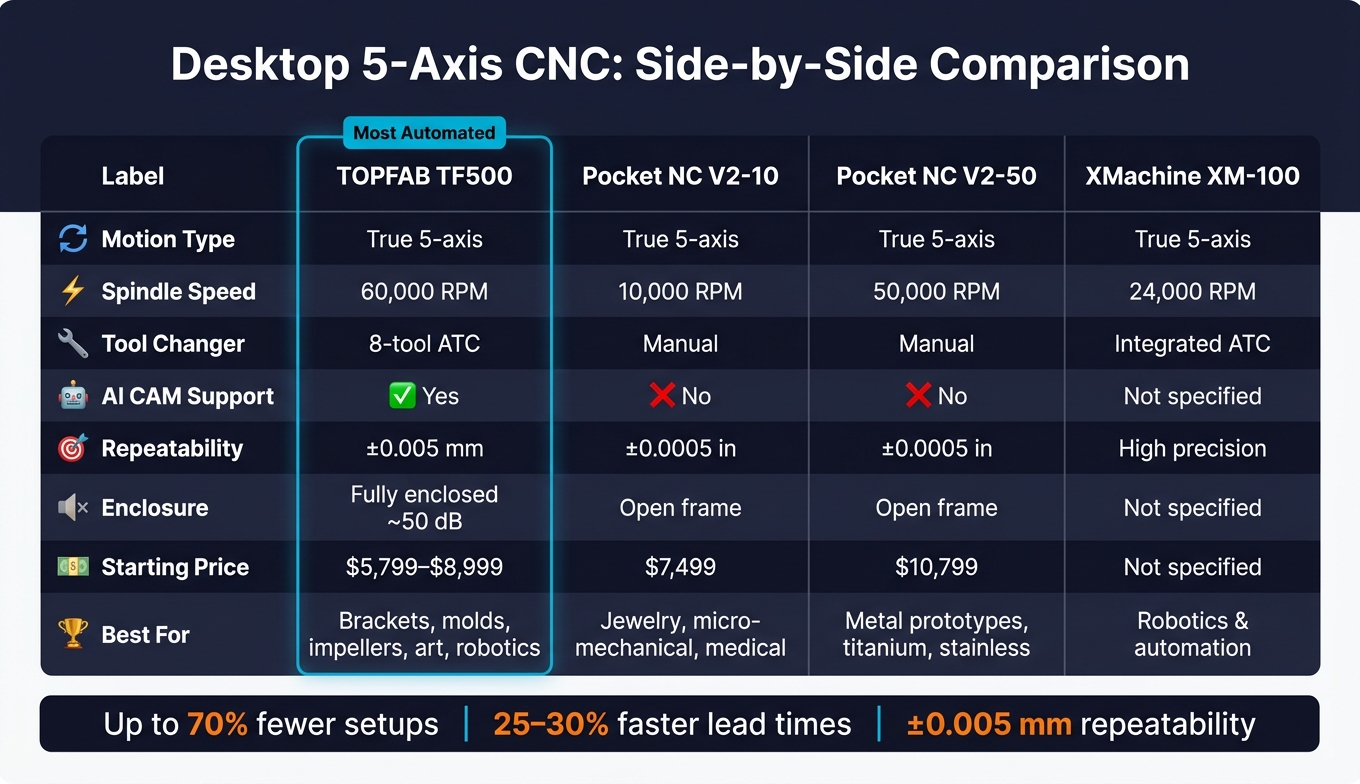
Desktop 5-Axis CNC Machines Compared: Features, Specs & Best-Fit Projects
If you're picking a machine for the parts above, this side-by-side view helps cut through the noise. All four can machine small 5-axis parts. Where they split is in workflow, automation, and the kind of user each one is built for.
| Feature | TOPFAB TF500 | Pocket NC V2-10 | Pocket NC V2-50 | XMachine XM-100 |
|---|---|---|---|---|
| Motion Type | True simultaneous 5-axis | True simultaneous 5-axis | True simultaneous 5-axis | True simultaneous 5-axis |
| Spindle Speed | 60,000 RPM | 10,000 RPM | 50,000 RPM | 24,000 RPM |
| ATC | 8-tool ATC | Manual tool changes, with a high-precision tool length probe | Manual tool changes, with a high-precision tool length probe | Integrated ATC |
| AI CAM Support | Yes - AI-generated toolpaths from text or images | No - CAD/CAM workflows | No - CAD/CAM workflows | Not specified |
| Repeatability | ±0.005 mm | ±0.0005 in. homing | ±0.0005 in. homing | High precision |
| Enclosure / Noise | Fully enclosed, ~50 dB | Open frame | Open frame | Not specified |
| Starting Price (USD) | $5,799 (VIP reservation) / $8,999 MSRP | $7,499 | $10,799 | Not specified |
| Best-Fit Projects | Brackets, molds, impellers, art, and robotics parts | Jewelry, micro-mechanical parts, and medical prototypes | Metal prototypes, titanium, and stainless steel | Robotics and automation parts |
Each machine goes after a different slice of the desktop 5-axis space. For makers doing short-run parts, the big tradeoff is simple: setup time vs. programming time.
Pocket NC V2-10 and V2-50 lean toward users who are comfortable with standard CAD/CAM work and manual tool changes. That can be a good fit for small, precise parts where the operator doesn't mind spending more time up front. The V2-50 also pushes much harder into tougher metals, with its 50,000 RPM spindle and fit for titanium and stainless steel work.
XMachine XM-100 sits more in the robotics and automation lane, with true simultaneous 5-axis motion and an integrated ATC. But some key details, like price and enclosure info, aren't listed here, so its day-to-day workflow is a little harder to size up from specs alone.
TF500 stands out most on the automation side. It pairs AI-generated CAM with an 8-tool ATC, which is a big deal if you want to move from idea to finished part without manually building every toolpath or hand-writing G-code. Its fully enclosed build and roughly 50 dB noise level push that same message: less friction, less mess, less hassle.
Across the 10 part types covered above, TF500 is the most automation-friendly desktop option for makers who want a faster, simpler workflow.
Conclusion
A desktop 5-axis CNC starts to make sense when a part no longer works in a clean 3-axis flow. Think multiple faces, undercuts, or compound curves. Across the 10 parts above, the pattern is pretty clear: 5-axis matters when geometry gets too complex for one clean setup.
If a part needs three or more setups on a 3-axis machine, 5-axis is often the better fit. It can cut setups by up to 70% and trim lead times by 25%–30%. That means you can keep complex geometry in-house and move faster when you're iterating on complex prototypes and functional parts.
The 10 examples above all fit the same profile: small enough for desktop machining, but complex enough to justify 5-axis. These aren't theory pieces or showroom demos. They're the kind of small, practical jobs that make desktop 5-axis worth using. Flat, simple parts still belong on 3-axis. That's the line where desktop 5-axis stops feeling like a luxury and starts working like a practical production tool.
FAQs
How do I know if my part really needs 5-axis?
Choose 5-axis machining when a part needs tool access from several angles, includes undercuts, or has complex curved surfaces that would be hard to machine with multiple manual setups.
For simple flat or prismatic parts, 3-axis machining is often the lower-cost option. But for parts like impellers, molds, or prosthetics, 5-axis can improve accuracy, cut down on repositioning errors, and produce better results in a single setup.
What software do I need to run a desktop 5-axis CNC?
To run a desktop 5-axis CNC, you need CAM software to turn your 3D CAD designs into toolpaths.
That software writes the instructions for simultaneous movement across the machine’s three linear axes and two rotational axes. And here’s the part that catches a lot of people off guard: 5-axis toolpath capability usually doesn’t come with the machine itself.
So if a desktop 5-axis setup is in your plans, budget for a professional CAM subscription like Fusion 360 as part of your workflow.
What parts are too big or too simple for a desktop 5-axis CNC?
Desktop 5-axis CNCs have a small work envelope. In most cases, it’s under 8 in. × 8 in. × 6 in., which makes these machines a poor fit for large parts.
They also don’t have the stiffness needed for heavy roughing or long production runs. Push them too hard, and you can run into precision drift, vibration, and tool wear.
Hard materials such as stainless steel, tool steel, titanium, and superalloys are usually not recommended on these machines. And if you’re making simple flat or prismatic parts, a 3-axis machine is often the better choice.


