

Can a Desktop CNC Machine Handle Metal? Common Questions
Yes - a desktop CNC can cut metal, but mostly small parts, light cuts, and softer metals. If I were giving the short answer, I’d say this: start with 6061 aluminum or brass, expect shallow passes, and don’t plan on heavy steel work.
Here’s the article in plain English:
- Best metals: 6061 aluminum, brass, and light copper work
- Harder metals: mild steel and stainless only make sense on stiff desktop mills
- Typical cut depth: about 0.002–0.016 in. per pass in aluminum on many desktop setups
- Common spindle range for metal: about 500–800W
- Typical aluminum starting settings: 9,000–11,000 RPM and 200–450 mm/min
- Common part size range: around 8 × 8 × 6 in. or smaller
- Expected accuracy for many non-ferrous jobs: about ±0.05–0.1 mm
- Extra setup cost: often $1,000–$3,000 for vise, collets, end mills, and chip clearing gear
What decides the result is not just the machine label. It’s the full setup:
- Rigidity
- Spindle power
- Tooling
- Feeds and speeds
- Workholding
- Chip removal
If your goal is prototypes, custom brackets, enclosures, plates, or small-batch aluminum parts, a desktop CNC can fit. If you need large steel parts, deep cuts, or shop-level output, it’s the wrong class of machine.
| Machine type | Best use | Metal fit |
|---|---|---|
| Entry desktop router | Learning, PCB work, light engraving | Limited aluminum |
| Prosumer desktop mill | Prototypes, small custom parts | Aluminum, brass, some copper |
| Benchtop mill | Small-shop part making | Steel, stainless, aluminum |
| Industrial VMC | Production work | All common metals |
So before I buy a desktop CNC for metal, I’d ask one simple question: am I making small non-ferrous parts, or am I trying to do mill-level steel work on a small frame? That answer usually tells me what machine class I need.
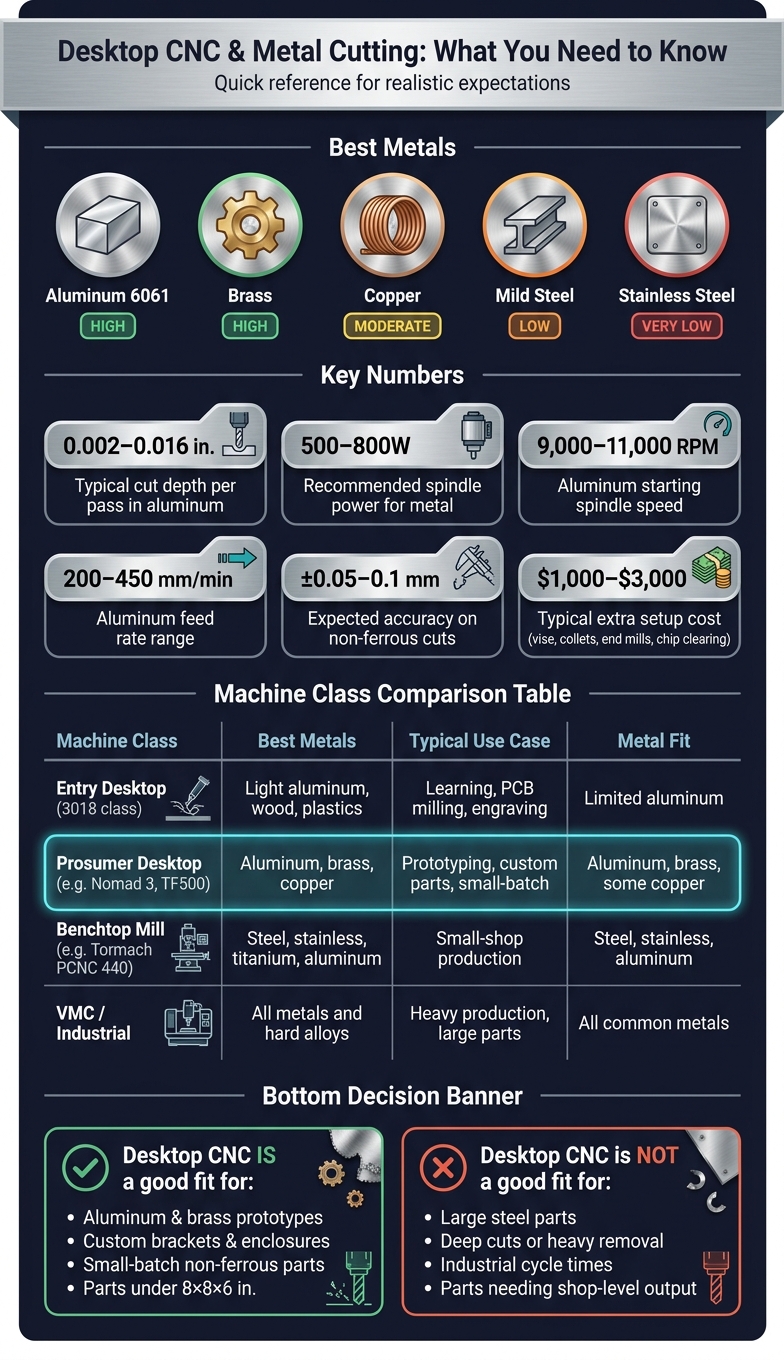
Desktop CNC for Metal: Machine Classes Compared
Can You Cut Aluminum on a Desktop CNC?
sbb-itb-0a29f4d
What metals can a desktop CNC realistically cut?
Not every metal makes sense on a desktop CNC. The list is shorter than a lot of spec sheets make it seem. And that gap between possible and useful matters a lot when you're planning an actual part.
Aluminum, brass, and copper: the most practical starting metals
6061 aluminum is the baseline metal for desktop CNC tuning. It handles light cuts and small cutters well, which is why so many desktop setups start there. A chip load of 0.001–0.003 inches works well for most desktop machines.
Brass is usually one of the easier metals to machine on a small CNC. It cuts cleanly and doesn't build up much heat, so it's a good fit for tags, plates, and engraved parts.
Copper is tougher. It tends to gall onto the cutter, which can turn a clean job into a mess fast. You need sharp tools and steady chip clearing to keep things under control. On most desktop machines, it's best suited to PCB isolation milling or light engraving.
Mild steel and stainless: only practical on rigid, purpose-built machines
Once you move past nonferrous metals, machine rigidity becomes the main issue. Mild steel and stainless need high torque at low RPM, not just a fast spindle. They also need a stiff frame that can resist chatter and deflection.
That doesn't mean they're off the table. A purpose-built desktop mill can make light passes in both materials. But in day-to-day use, they're better treated as occasional jobs, not something you'll cut all the time.
| Metal | Practicality | Typical Operations |
|---|---|---|
| Aluminum 6061 | High | Profiling, pocketing, drilling |
| Brass | High | Engraving, tags, electrical components |
| Copper | Moderate | PCB milling, light engraving |
| Mild Steel | Low (machine dependent) | Light passes, shallow engraving |
| Stainless Steel | Very Low | Shallow engraving or marking only |
Those limits don't just affect which metal you can cut. They also shape cut depth, part size, and the finish you can expect.
What cuts, part sizes, and results can you expect?
Small parts and light to moderate cuts are the main use case
Once the metal is machinable, the next big limits are part size and cut depth. Desktop CNCs do best when the job is small and the cuts stay under control. Think aluminum brackets, custom electronics enclosures, and brass nameplates - parts that fit well inside a work area of about 8 × 8 × 6 in. (200 × 200 × 150 mm). That’s the comfort zone.
Aluminum usually needs shallow passes on desktop CNCs, around 0.002–0.016 in. per pass. Brass is also a solid fit, with typical speeds around 10,000–14,000 RPM and a depth of cut of about 0.020–0.030 in. per pass. If you move into higher-end desktop 5-axis machines, jewelry-scale work and small mechanical parts with compound curves or angled ports are also on the table. At that point, spindle power and fixturing play a big role in how clean the finished part looks.
Surface finish and accuracy depend on setup, not just specs
A tight precision number on a spec sheet doesn’t automatically mean tight parts. In day-to-day use, accuracy depends on small parts being fixtured well, tool stick-out staying short, and chips clearing out the way they should. For most desktop CNC users cutting non-ferrous metals, a fair expectation is about ±0.05–0.1 mm on standard cuts.
On curved surfaces, 5-axis motion can help improve surface finish because the tool can tilt and leave fewer marks. That can make a clear difference on parts where the surface matters, not just the dimensions.
One issue people often miss in small-batch work is precision drift. Vibration, tool wear, and heat can nudge dimensions from one part to the next during a run. For a one-off prototype, that’s usually no big deal. For a larger batch, it means you should expect some variation between parts. In other words, setup matters just as much as the metal you’re cutting.
What machine setup does metal cutting require?
Spindle, rigidity, and tooling matter more than raw RPM
Once the metal is workable, the setup makes or breaks the cut. More RPM alone won’t turn a desktop CNC into a good metal-cutting machine. Rigidity is the big deal. A stiff machine with moderate power will usually beat a flexy machine with a stronger spindle. When a machine bends under load, you get chatter, missed dimensions, and broken tools.
Frames made from cast aluminum or steel do a better job of damping vibration than lightweight extrusions. For light engraving, 100–120W spindles can do the job. But if you want to cut metal, you’ll usually need a 500–800W spindle with ER11 collets.
Tool choice matters just as much. Use sharp carbide end mills. For aluminum, 1- or 2-flute cutters are a good fit. ZrN works well for aluminum and brass, while AlTiN is the better pick for stainless.
Feeds, speeds, workholding, and chip clearing decide the outcome
Once the cutter is sorted out, the result comes down to feeds, clamping, and chip clearing. Most failed metal cuts happen for pretty plain reasons: feeds are too aggressive, the part isn’t clamped well, or chips aren’t getting out of the way.
For aluminum on a 500W desktop spindle, a solid starting range is 9,000–11,000 RPM, with a feed rate of 200–450 mm/min and a depth of cut between 0.2–0.6 mm. Adaptive or trochoidal toolpaths help keep tool load steady through corners and pockets. That matters because those are the spots where desktop machines are most likely to stall or start chattering. When you move to harder materials, the answer is usually slower feeds or smaller cutters, not more speed.
Keep tool stick-out as short as you can to cut down on leverage and deflection. For workholding, a machinist vise or T-track clamps are solid choices for small metal parts. Double-sided tape can also work for small parts. For chip clearing, use air blast or MQL, and skip flood coolant on most desktop setups. Don’t let chips recut. That’s a fast way to snap tools and wreck parts.
Where the limits are and how to decide if a desktop CNC fits your needs
Best fit: prototyping, custom parts, and small-batch non-ferrous work
Once you’ve sorted out spindle power, rigidity, tooling, and chip control, the next step is pretty simple: does the machine match the parts you need to make?
A desktop CNC is a good fit for aluminum and brass prototypes, small custom parts, and light copper work. The TF500 also brings simultaneous 5-axis motion and automatic tool changes, which helps when you’re making more complex parts.
You should also plan for the basics. In most cases, that means about $1,000 to $3,000 for items like a machinist vise, collets, carbide end mills, and chip-clearing gear. If you need advanced CAM, that can add another software cost.
The fastest way to make the call is to line up your parts with the right machine class.
| Feature | Entry Desktop (3018 class) | Prosumer Desktop (TF500, Nomad 3) | Benchtop Mill (Tormach PCNC 440) | VMC / Industrial |
|---|---|---|---|---|
| Best metals | Light aluminum, wood, plastics | Aluminum, brass, copper | Steel, stainless, titanium, aluminum | All metals and hard alloys |
| Typical use case | Learning, PCB milling, light engraving | Prototyping, custom parts, small-batch work | Small-shop production, tooling | Heavy production, large parts |
Pocket NC, Nomad 3, and TF500 all aim at desktop metal work. TF500 stands out because it offers true 5-axis motion plus an automatic tool changer in a compact footprint.
Key takeaway: yes for realistic metal jobs, no for heavy production or large steel work
This is where the buying choice gets easier.
Pick a desktop CNC for prototypes, one-off custom parts, and small non-ferrous batches. If your work involves heavy steel removal, larger parts, or industrial cycle times, you’ll want a benchtop mill or outsourced machining instead.


