

Small CNC vs Outsourcing: Which Is Better for Makers?
If you make parts often, buy a small CNC only when the work volume is high enough to justify it. If you don’t, outsourcing is usually the better call.
Here’s the short answer:
- I’d outsource if I need less than 20 machine-hours per month
- I’d look at buying if outsourcing costs hit about $30,000–$50,000 per year
- I’d keep work in-house for same-day prototypes, part revisions, and private designs
- I’d send work to a shop for tight tolerances, hard metals, better surface finish, or larger parts
The choice usually comes down to 7 things:
- Upfront cost
- Per-part cost
- Materials
- Tolerance
- Part complexity
- Lead time
- Skill and maintenance
A small CNC can cut your wait from 1–3 weeks to the same day for test parts. But ownership often costs far more than the machine price alone. A desktop unit may cost $1,500–$8,000, yet first-year spending can reach about 2x that once you add tooling, CAM, workholding, and scrap. On the other side, outsourcing simple aluminum parts often runs about $80–$300 per part, with rush jobs adding 20%–40%.
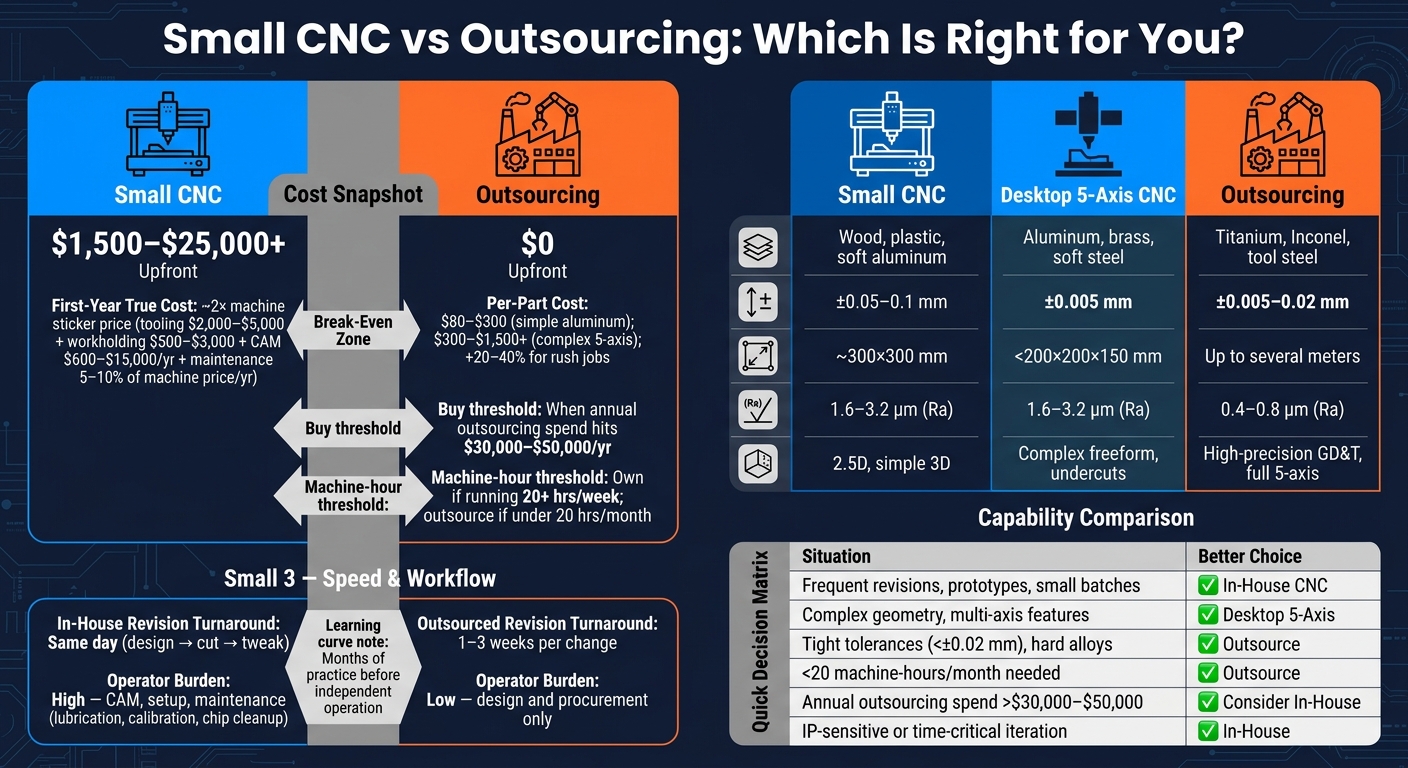
Small CNC vs Outsourcing: Full Cost & Capability Breakdown for Makers
Why Should Manufacturers Buy CNC Machines Over Outsourcing?
sbb-itb-0a29f4d
Quick Comparison
| Factor | Small CNC | Outsourcing |
|---|---|---|
| Upfront cost | $1,500–$25,000+ | $0 |
| Best for | Prototypes, repeat small parts, same-day changes | Tight-tolerance parts, hard metals, low-volume jobs |
| Typical lead time | Same day to a few days | 1–3 weeks |
| Materials | Wood, plastic, acrylic, aluminum, some brass/soft steel | Almost any shop-grade metal or plastic |
| Tolerance | Often ±0.05 mm to ±0.1 mm | Often ±0.005 mm to ±0.02 mm |
| Skill needed | High | Low |
| Maintenance | You handle it | Shop handles it |
My take: if you want control and fast iteration, a small CNC makes sense. If you want precision without the hassle, outsourcing is usually the better fit.
Below, I’ll break down where each option wins and where it doesn’t.
Cost: Machine Purchase Price vs Per-Part Shop Quotes
Machine price is only one line item. Tooling, software, training, setup, and scrap can push first-year spend to 2x the sticker price. So for simple aluminum brackets, acrylic panels, and prototype parts, the main question is pretty practical: Is it cheaper to own the machine or pay a shop per part? The only fair way to answer that is to compare the full cost of ownership with what U.S. shops usually charge.
What It Actually Costs to Own a Small CNC
A basic desktop 3-axis CNC usually costs $1,500–$8,000, while a desktop 5-axis machine like the TF500 usually lands in the $5,000–$25,000 range. That sounds manageable at first glance. Then the extra costs start showing up.
A tooling starter kit often adds $2,000–$5,000. Workholding can add another $500–$3,000. CAM software might cost about $600 per year for a cloud plan or as much as $15,000 for a perpetual license. On top of that, you still have power, consumables, and maintenance, which are often estimated at 5%–10% of machine price per year.
Put it all together, and the machine itself often makes up only about half of first-year cost.
That number matters when you stack it next to the price of having the same part made by a shop.
How U.S. Machine Shops Price Parts
When you outsource a part, the quote usually bundles in setup time, CAM programming, machine time, raw material, finishing, and shipping. In the U.S., machine-shop rates often fall between $35 and $150 per machine hour.
For a simple aluminum bracket, a quote will often land around $80–$300 per part. If the part needs complex 5-axis geometry, pricing can jump to $300–$1,500+. Need it fast? Rush turnaround often adds a 20%–40% premium.
The big upside is simple: outsourcing avoids the upfront buy-in. You pay for the part itself, not the machine, tooling, software, or maintenance.
A Simple Break-Even Rule of Thumb for Makers
Here’s the rough rule.
- If your workload is below 20 machine-hours per month, outsourcing is usually the cheaper route.
- Ownership starts to look better when the machine runs at least 20 hours a week on a steady basis.
- Buying starts to make more sense when annual outsourcing spend reaches about $30,000–$50,000.
| Desktop 3-Axis CNC | Desktop 5-Axis (e.g., TF500) | Outsourced Job Shop | |
|---|---|---|---|
| One-Time Cost | $1,500–$8,000 | $5,000–$25,000 | $0 upfront |
| Low-Volume Part Cost | High due to setup and learning | High due to CAM complexity | $80–$300 per part for a simple aluminum part |
| Ongoing Costs | Tooling, CAM, power, maintenance | Tooling, 5-axis CAM, maintenance | Per-part invoice + shipping |
| Hidden Costs | Scrap, tool changes, learning curve | Calibration drift, CAM tuning | Rush fees (20%–40%) |
Cost is only one filter. Material limits and part geometry shape the next part of the decision.
Capability: Materials, Tolerances, and Part Complexity
Cost gets you in the door. Capability tells you if the part can actually be made.
What Desktop CNCs Can Handle in a Maker Workflow
Desktop 3-axis machines are a good fit for wood, plastics, and light aluminum work. That covers a lot of maker projects.
The trouble starts when you ask them to hold tight accuracy for long cuts in harder metals. That’s when machine flex starts showing up in the part: chatter marks in aluminum, taper in deep pockets, and snapped end mills if feed rates get too aggressive.
Desktop 5-axis machines like the TOPFAB TF500 push things further. You get simultaneous 5-axis motion for compound angles, undercuts, and freeform surfaces. It also includes an 8-tool automatic tool changer, a 60,000 RPM spindle, and AI-assisted model and toolpath generation. At that point, the main issue isn’t just whether the machine can move that way. It’s whether your part stays inside the machine’s tolerance range, work envelope, and material limits.
When Precision and Geometry Push You Toward Outsourcing
Desktop machines usually hold about ±0.05 mm to ±0.1 mm, which is fine for most maker parts. But once a part needs tighter than ±0.02 mm, GD&T callouts, or a surface finish around Ra 0.4–0.8 µm, you’re in shop-grade territory.
Size is another hard limit. Most desktop work envelopes top out around 200 × 200 × 150 mm. Material choice matters too. Hardened steels, stainless steel, titanium, and Inconel need the high-torque spindles and rigid frames you get from industrial machines.
So yes, desktop CNCs are convenient. But convenience isn’t the same thing as shop-grade output.
| Desktop 3-Axis | Desktop 5-Axis (e.g., TF500) | Industrial Outsourcing | |
|---|---|---|---|
| Materials | Wood, plastic, soft aluminum | Aluminum, brass, soft steel | Titanium, Inconel, tool steel |
| Typical Tolerance | ±0.05–±0.1 mm | TF500 example: ±0.005 mm | ±0.005–±0.02 mm |
| Work Envelope | Small (e.g., 300 × 300 mm) | Compact (<200 × 200 × 150 mm) | Large (up to several meters) |
| Surface Finish (Ra) | 1.6–3.2 µm | 1.6–3.2 µm | 0.4–0.8 µm |
| Geometry Complexity | 2.5D, simple 3D | Complex freeform shapes, undercuts | High-precision GD&T and complex 5-axis work |
| Best For | Signs, simple brackets, panels | Jewelry, dental parts, drone prototypes | Aerospace, medical, engine components |
If the part fits the machine but not your timeline or skill level, then speed and workload start to matter more than raw machine specs.
Desktop 5-Axis Options Compared: TF500 vs Competitors
The desktop 5-axis space has grown a lot. But machines in this group don’t all work the same way.
Most entry-level desktop 5-axis machines use 3+2 positioning. In plain English, the rotary axes move to a fixed angle, then the machine cuts in 3-axis mode. That helps you reach more faces without re-fixturing, which is handy. But it won’t give you smooth freeform surfaces.
The TF500 offers true simultaneous 5-axis motion. That’s the type of motion you need for compound curves, undercuts, and other complex surfaces where the tool has to stay tangent through the cut.
It also adds AI image-to-3D-model generation and AI toolpath creation. That matters for a simple reason: it cuts setup time and makes one-off parts less of a CAD/CAM slog.
Speed and Workload: Lead Times, Iteration, Skills, and Maintenance
Capability only matters if the part shows up when you need it.
Why In-House CNC Is Faster for Iteration
Once you know a machine can make the part, the next issue is workflow: how fast can you test, fix, and run it again?
When the machine is in the same room, the loop gets short. You can design a part, cut it, inspect it, spot the problem, and cut a revised version that same afternoon. That speed is a big deal in early product work. Prototype cycles, bracket changes, acrylic fit checks, and small-batch part edits all move better when turnaround happens the same day.
Outsourcing slows that loop down at each step. A revision usually means sending a new RFQ, waiting for DFM feedback, getting into the shop’s queue, and then waiting on shipping. In most cases, that adds up to 1–3 weeks for each change.
| Dimension | In-House Desktop CNC | Outsourced Machining |
|---|---|---|
| Revision Turnaround | Same day (design → cut → tweak) | 1–3 weeks per change |
| Operator Burden | High (ongoing CAM, setup, adjustments) | Low (design and procurement only) |
| Maintenance Tasks | Weekly/monthly (lubrication, calibration) | None - handled by the shop |
Skills and Maintenance You Take On as an Owner
Owning a desktop CNC means you’re not just buying a machine. You’re also taking on the jobs of programmer, setup tech, and maintenance person.
Before you cut your first part, you need a working grasp of CAD/CAM software, feeds and speeds for the material you’re using, workholding, tool setup, and offsets. For most new operators, it takes months of practice to work on their own without much help.
Then there’s upkeep. Lead-screw lubrication, belt tension checks, chip cleanup, spindle warm-up cycles, and periodic calibration all land on you. If something fails in the middle of a job, production stops until you sort it out. AI-assisted systems like the TOPFAB TF500 can shorten the ramp-up, but they don’t replace machining judgment, especially when material behavior shifts or tools start wearing down.
That’s the trade: faster iteration and more control, in exchange for more hands-on work and more responsibility.
Decision Framework: Which Option Fits Your Projects
Cost, capability, speed, and workload all point to one simple call: buy or outsource. The easiest way to make that call is to match the job to what the machine can and can’t do.
When a Small CNC Is the Better Choice
An in-house CNC usually makes the most sense for repeatable, lower-complexity parts. If your design is still moving around, same-day iteration can matter more than shop-level precision. That alone can save a lot of back-and-forth.
It’s also a strong option for IP-sensitive work. Keeping files and parts in-house removes a real risk. And while a desktop 5-axis machine opens the door to more geometry, it still doesn’t remove limits around throughput or tolerance. So the sweet spot here is control and iteration, not just output.
When Outsourcing Is the Better Choice
Outsourcing makes more sense when the part calls for more than a desktop machine can deliver with consistency. That includes hard alloys, tolerances tighter than ±0.02 mm, or surface finish finer than Ra 0.8 µm.
Low volume is another big factor. If you’re not running enough work, ownership costs usually don’t pay back. In other words, use the threshold, not personal preference, to make the call.
Key Takeaways for U.S. Makers
Use the matrix below to turn the trade-offs into a clear choice.
| Situation | Better Choice |
|---|---|
| Frequent revisions, prototypes, small batches | In-house desktop CNC |
| Complex geometry, multi-axis features | Desktop 5-axis (e.g., TF500) |
| Tight tolerances (< ±0.02 mm), hard alloys | Outsource to industrial shop |
| < 20 machine-hours/month needed | Outsource |
| Annual outsourcing spend > $30,000–$50,000 | Consider bringing in-house |
| IP-sensitive or time-critical iteration | In-house |
A lot of U.S. makers will land in the middle and use both. They’ll run a desktop CNC for validation, then send parts out when the job needs tighter precision or more volume.
FAQs
How do I know if my workload is high enough to justify buying a CNC?
Look at your annual spindle hours and your repeat outsourcing spend. If your workload is below 1,000 to 2,000 productive hours per year, or the machine would run less than 20 hours a week, outsourcing is usually the lower-cost move.
Another clear financial signal shows up when your outsourced machining bill keeps climbing past $30,000 to $50,000 per year. Up to that point, outsourcing gives you room to test demand before you take on the upfront machine cost and the monthly expense that comes with owning it.
What hidden costs should I expect beyond the machine price?
Beyond the purchase price, plan for first-year costs to climb by 20% to 50%.
Those added costs usually come from a few places: CAM software, starter tooling like end mills, drill bits, collets, and vises, plus replacement parts as you go.
You’ll also want room in the budget for shop upgrades, such as 240V power, compressed air, and floor prep. On top of that, factor in training, preventive maintenance, electricity, and consumables like coolant.
When should I prototype in-house but outsource final parts?
This hybrid approach makes sense when you need fast feedback, quick design changes, and the room to test multiple versions in a single day. A desktop CNC is a good fit for prototyping because you can tweak the design and cut a new part right away, instead of sitting around waiting on a supplier.
Once the design is proven, outsource the final parts. That move makes sense when you need tighter precision, more consistent materials, or more volume than your desktop machine can deliver with confidence.


