

5-Axis CNC vs 3-Axis CNC: What's the Difference?
If your part needs features on three or more faces, 5-axis is often the better pick. If it’s flat, simple, and can be finished in one or two setups, 3-axis usually costs less.
Here’s the short version:
- 3-axis CNC moves in X, Y, and Z
- 5-axis CNC adds two rotary axes so the tool or part can tilt
- 3-axis is best for plates, brackets, manifolds, and simple pockets
- 5-axis is better for multi-face parts, angled holes, deep cavities, impellers, and curved surfaces
- Each extra setup on 3-axis can add 15–30 minutes
- 5-axis can hold face-to-face alignment around ±0.0005–0.001 in.
- Multi-setup 3-axis work is often around ±0.002–0.005 in.
- On contoured parts, 5-axis can improve finish because it often uses shorter, stiffer tools
- 3-axis shop rates are often about $75–$125/hour
- Industrial 5-axis rates are often about $125–$200/hour
- Even so, on parts with four or more faces, 5-axis quotes can come in lower 60%–70% of the time
- A sample four-face aluminum housing can drop from $280 on 3-axis to $195 on 5-axis
So the main difference is simple: 3-axis is lower-cost for simple parts, while 5-axis cuts setup time and error on harder parts. If I were choosing, I’d look at part geometry, setup count, tolerance across faces, CAM skill, and batch size first.
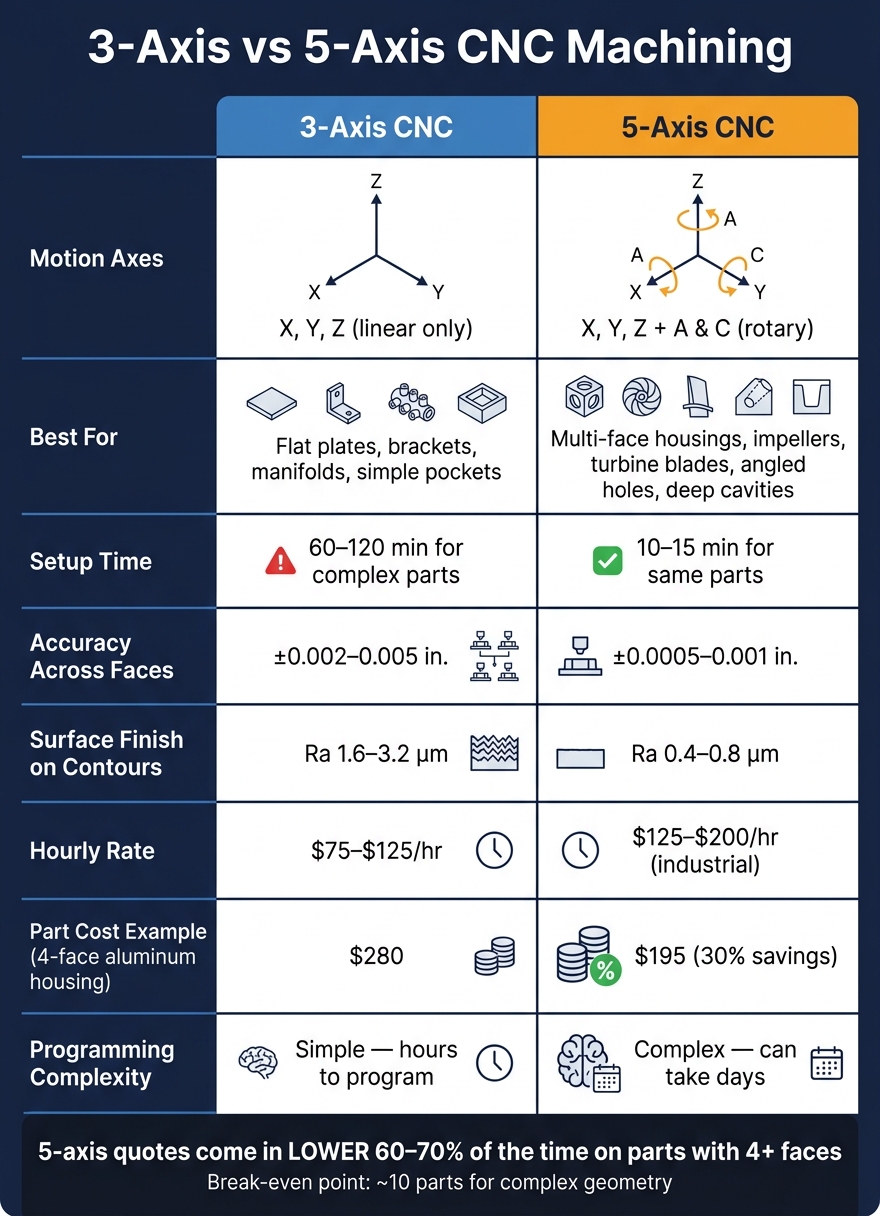
3-Axis vs 5-Axis CNC: Key Differences at a Glance
5-Axis VERSUS 3-Axis - Which Would You Choose? UMC-500SS or VF-4SS - Haas Automation, Inc.
sbb-itb-0a29f4d
Quick Comparison
| Criteria | 3-Axis CNC | 5-Axis CNC |
|---|---|---|
| Motion | X, Y, Z | X, Y, Z + 2 rotary axes |
| Tool angle | Fixed vertical | Can tilt and rotate |
| Best for | Flat and prismatic parts | Multi-face and curved parts |
| Setups | More on complex parts | Fewer, often one setup |
| Accuracy across faces | Lower on multi-setup jobs | Better from one setup |
| Surface finish on contours | Good | Often smoother |
| Programming | Simpler | Harder |
| Hourly cost | Lower | Higher |
| Part cost for simple work | Lower | Higher |
| Part cost for complex work | Can go up from labor | Can drop from fewer setups |
Bottom line: buy or quote 5-axis for access and fewer setups, not just because it has more axes.
How 3-axis and 5-axis CNC machines move
3-axis motion: X, Y, and Z from a fixed vertical direction
A 3-axis CNC machine moves along three straight paths: X (left to right), Y (front to back), and Z (up and down). The spindle stays vertical, so the machine can reach the top face in one setup.
The catch shows up when a part has features on more than one face. Then you have to stop the machine, unclamp the part, flip or rotate it, reset the work offset, and run the next operation. Each flip adds 15 to 30 minutes and can bring more alignment error.
That setup limit is why 3-axis machines work well for simple parts, but tend to slow down on multi-face jobs.
5-axis motion: adding two rotary axes for angle and access
A 5-axis machine keeps the same three linear axes and adds two rotary ones. The most common setup is A (rotation around X) and C (rotation around Z), though some machines use B (rotation around Y) instead. That extra motion lets the tool or the part tilt and rotate, so the cutter can come in from many angles.
In day-to-day use, 5-axis machining usually shows up in two forms:
- 3+2 machining: The rotary axes lock into place, then the machine cuts like a 3-axis system.
- Simultaneous 5-axis: All five axes move at the same time for curved surfaces like impellers and turbine blades.
Because a 5-axis machine can tilt the part to reach deep features, it can often use shorter, stiffer tools. That matters more than it might seem. Shorter tools cut down on flex, chatter, and surface finish issues.
Those extra angles are what allow 5-axis machines to finish complex parts with fewer setups.
Desktop machine layouts and what they change
A standard 3-axis layout moves the table in X and Y while the spindle moves in Z. Desktop 5-axis systems often use either a trunnion (A+C) layout, where the workpiece tilts and rotates on the table, or a swivel-head (B+C) layout, where the spindle tilts.
In plain terms, the layout changes what kind of parts the machine handles best. Trunnion layouts fit compact, multi-face parts well, while 3-axis machines fit simpler, repeatable work. The TF500 uses a compact trunnion layout suited to small, complex parts.
On desktop machines, the layout also sets a practical limit on part size and part complexity.
| Feature | 3-Axis Desktop | 5-Axis Desktop (e.g., TF500) |
|---|---|---|
| Motion axes | X, Y, Z (linear) | X, Y, Z + A, C (rotary) |
| Tool orientation | Fixed vertical | Variable - tilts and rotates |
Those motion differences lead straight to differences in part type, setup count, and surface finish.
What each machine can make and where it fits
Once the motion side is clear, the next step is part geometry. That’s what usually decides which machine makes the most sense.
Parts that work well on 3-axis CNC
A 3-axis machine is a solid match for prismatic parts. Think flat, boxy shapes with square features: flat plates, simple brackets, manifolds with straight bores, hole patterns, and shallow pockets. For simple prismatic work, 3-axis is usually the lowest-cost option.
The downside shows up when the shape gets harder to reach. Undercuts or inward-leaning walls often need extra setups on a 3-axis machine. And every time a part gets re-fixtured, you add another chance for alignment error. That error can stack up as the setup count grows.
Once a part includes angled faces, undercuts, or deep cavities, 5-axis often starts to make more sense.
Parts that work well on 5-axis CNC
Five-axis machines are a better fit for multi-sided housings, deep pockets, impellers, turbine blades, angled holes, and organic shapes. Some of these features simply need the tool to tilt so it can reach the surface the right way.
For multi-face prismatic parts, 3+2 positioning is often enough. True simultaneous 5-axis is mostly used for impellers, turbine blades, and other freeform shapes. Deep molds also tend to favor 5-axis because the machine can reach into the cavity with shorter tools and fewer secondary operations. That extra access matters a lot with deep cavities and undercuts.
There’s also an accuracy advantage across multiple faces. A 5-axis machine keeps all features tied to one setup reference, so alignment between faces is typically ±0.0005–0.001 in., compared with ±0.002–0.005 in. on a multi-setup 3-axis job.
When 3-axis is enough and when 5-axis is worth it
If a part can be finished in one or two setups, 3-axis is often the simplest and lowest-cost path. A good rule of thumb is to ask for a 5-axis quote when a part needs more than two setups on a 3-axis machine, or when it includes features you can’t reach without tilting the tool.
On parts with four or more faces, 5-axis quotes come in lower than 3-axis quotes 60%–70% of the time because the labor saved from removing re-fixturing is greater than the higher machine rate.
The easiest way to make the call is to look at the part geometry, not the hype around the machine.
| Part Type | Best Fit | Why |
|---|---|---|
| Flat plates, brackets, manifolds | 3-axis | One-sided; lowest hourly rate |
| Multi-sided housings | 5-axis (3+2) | Eliminates re-fixturing error between faces |
| Impellers, turbine blades | 5-axis (simultaneous) | Requires continuous tool orientation changes |
| Deep cavity molds | 5-axis | Shorter, stiffer tools prevent chatter |
Quality, speed, cost, and workflow tradeoffs
Surface finish, accuracy, and tool access
As part geometry gets harder to reach, the next issue is simple: what do you get from that extra tool access?
With 5-axis machining, the machine can tilt the tool so it stays closer to the surface. That usually leads to a smoother finish on curved shapes. In day-to-day shop terms, 3-axis often lands around Ra 1.6–3.2 µm on contoured geometry, while 5-axis can get to Ra 0.4–0.8 µm on that same surface.
The bigger win shows up on multi-face parts. Every time a part gets re-fixtured, you add another chance for stack-up error. Five-axis keeps all those features tied to one datum. One setup means one reference point, so face-to-face alignment can stay around ±0.0005–0.001 in., compared with ±0.002–0.005 in. across several 3-axis setups.
Programming difficulty, operator skill, and job speed
That better finish and access comes at a price: CAM work gets tougher.
3-axis CAM is simpler and faster to set up. Jobs like pocketing, contouring, and drilling can often be programmed in hours using 2D or 2.5D strategies. Shops also tend to have an easier time hiring and training operators for 3-axis work.
Five-axis takes more effort. Collision checking, tool orientation control, and simulation can stretch programming from hours into days when the toolpath is complex. Still, on parts that would need several 3-axis setups, 5-axis can cut total job time by a lot, even if the machine itself costs more per hour.
Take a four-face aluminum housing. On 3-axis, setup time can run 60–120 minutes. On 5-axis, that can drop to just 10–15 minutes total. Over a production run, that difference hits hard.
Machine price, software cost, and cost per part
Of course, none of those gains matter unless the part volume or geometry makes the extra machine and software cost worth it.
Industrial 5-axis machines often start around $100,000 and climb fast. Desktop systems like the TOPFAB TF500 lower that entry point for small parts and short runs. They bring 5-axis capability into smaller shops without taking over the floor, and they shrink the workflow into a much smaller machine footprint.
The TOPFAB TF500 offers true simultaneous 5-axis machining, ±0.005 mm precision, an 8-tool automatic tool changer, and built-in AI toolpath generation in a compact, enclosed desktop form factor - at a fraction of industrial pricing. Unlike other desktop 5-axis options, the TF500 combines that hardware with AI-assisted toolpath generation, which cuts down the programming load that often keeps 5-axis out of reach for smaller shops.
On a per-part basis, simple flat parts almost always cost less on 3-axis. The hourly rate is about $75–$125/hr versus $125–$200/hr for industrial 5-axis. But once the part gets more complex, the math can flip. A four-face aluminum housing quoted at $280 on 3-axis can drop to $195 on 5-axis - a 30% savings - because the labor saved from removing re-fixturing beats the higher machine rate. That crossover point usually shows up around 10–50 pieces for complex parts.
3-Axis vs 5-Axis at a Glance
| Feature | 3-Axis CNC | 5-Axis CNC (Industrial) | Desktop 5-Axis (TOPFAB TF500) |
|---|---|---|---|
| Best Part Types | Flat plates, brackets, prismatic parts | Impellers, turbine blades, complex contoured parts | Small complex prototypes, jewelry, custom parts |
| Setup Count | More flips for complex parts | Fewer setups | Fewer setups |
| Cost/Part (Simple) | Lowest | Higher | Moderate |
| Cost/Part (Complex) | Higher due to labor | Lowest at volume | Competitive for small runs |
Choosing the right machine for your shop
After you compare motion, part types, and the tradeoffs, the choice comes down to shop reality. Pick the machine based on part geometry, tolerance, batch size, and your CAM skill.
Flat, prismatic parts usually fit 3-axis work. Parts with features on three or more faces, or parts with compound angles, often make more sense on 5-axis.
Every extra setup adds another chance for alignment drift. That’s one of the big reasons 5-axis earns its keep: it keeps more features in a single setup.
For short prototype runs, cutting out extra setups can make 5-axis cost-competitive. The break-even point is often around 10 parts. That’s where desktop 5-axis machines can punch above their weight.
For makers and small shops, the TF500 gives desktop 5-axis access without industrial-scale cost. Its AI-assisted workflow cuts down the programming barrier that often puts 5-axis out of reach for smaller teams. For small shops, the right choice is the machine that fits part complexity before it fits ambition.
| Decision Factor | Go 3-Axis | Go 5-Axis (e.g., TF500) |
|---|---|---|
| Part faces with features | 1–2 faces | 3+ faces |
| Positional tolerance | Looser across faces | Tighter across faces |
| Batch size | High-volume simple parts | Short prototype runs |
| CAM experience | Standard 2D/2.5D | AI-assisted or advanced |
| Setup count | Usually 1–2 setups | Often 1 setup |
FAQs
How do I know when 5-axis is worth the extra cost?
Look at total part cost, not just the hourly rate. A 5-axis machine often earns its keep when a part would take three or more setups on a 3-axis machine. Fewer setups can balance out the higher machine cost.
It also makes sense when you need better than ±0.002 in. (±0.05 mm) accuracy between features on different faces. The same goes for parts with features a 3-axis machine simply can’t reach unless the tool is tilted.
Can 3-axis handle angled or multi-face parts at all?
Yes, but only with manual re-fixturing for each side.
Because the tool comes in from one direction, you need to stop the machine and flip or rotate the part to reach other faces.
That adds time and can introduce positioning errors each time the part is reclamped. More complex angled or multi-sided features also need multiple setups, while 5-axis can often machine them in a single operation.
Is 5-axis too hard for a small shop to program and run?
Not usually. For a small shop, 5-axis is often within reach if you focus on 3+2 positional machining instead of full simultaneous motion.
With 3+2, the rotary axes place the part at a fixed angle. Then the machine cuts like a 3-axis machine from that position. For many shops, that covers 80% to 90% of the work, which makes it a smart next step for teams that already feel comfortable with 3-axis workflows.


